Fricat: Finding the moments that matter across 8 cameras
A working household camera-monitoring dashboard
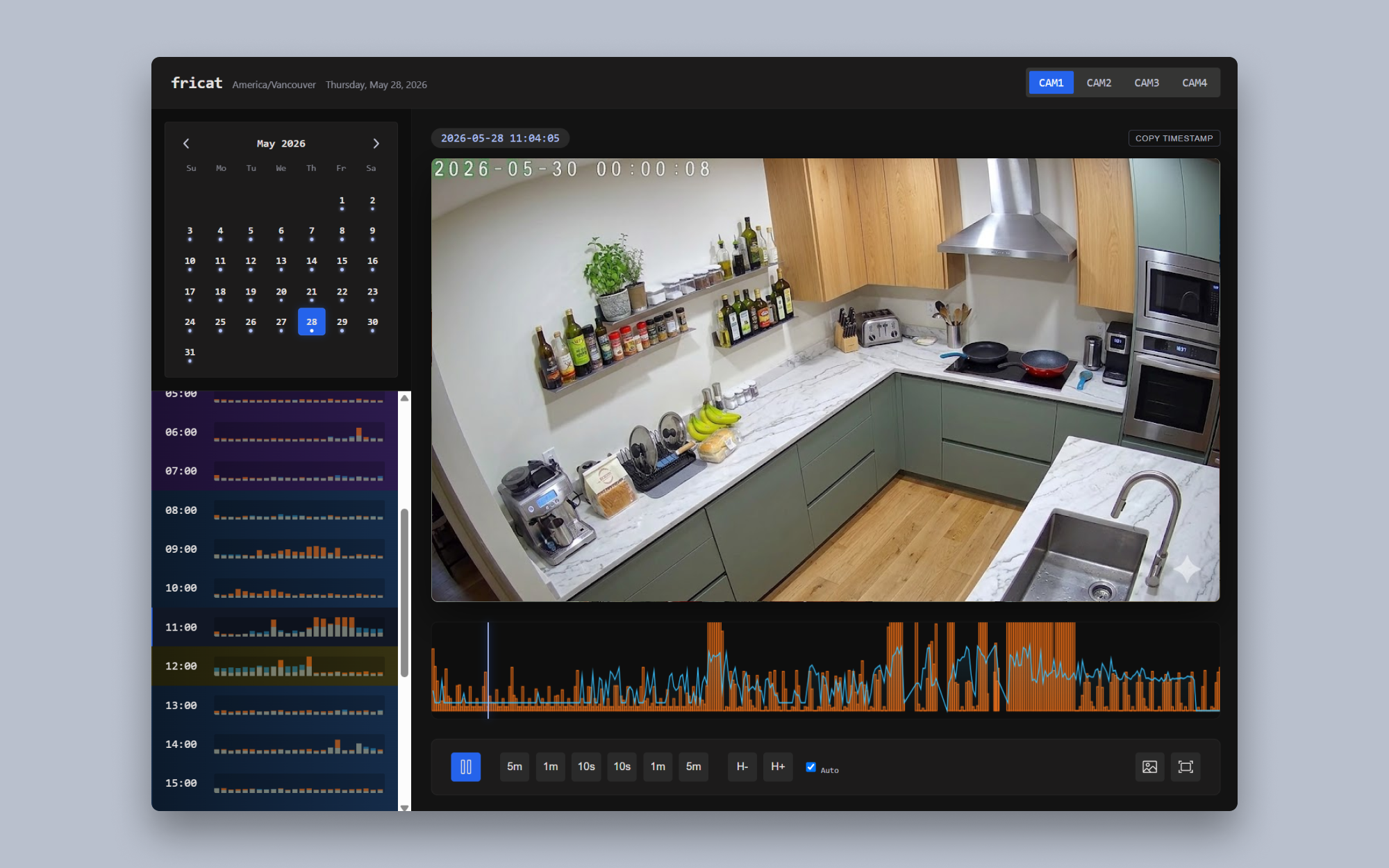
Reviewing footage across 8 household cameras made it difficult to find the few moments that mattered. I designed and built Fricat around a shared 24-hour activity timeline, giving my household a faster way to review recordings, locate motion events, capture evidence, and return to an exact timestamp.
- My role
- Product design and AI-assisted design and development
- Users
- My household
- Status
- Working product in current use
Context and problem
Monitoring 8 cameras creates an information problem, not just a video-playback problem. Live feeds help answer what is happening now, but previous recordings are where the useful evidence often lives. The interface needed to make long recordings navigable without losing the relationship between a camera, an event, and an exact time.
Fricat is a working household tool, not a concept or static mockup. My household currently uses it to view camera feeds, review previous recordings, and locate meaningful motion activity.
Key workflows
Move between live context and recorded evidence
Users can view camera feeds and switch into previous recordings when they need to investigate an earlier event. The information hierarchy keeps camera identity, playback context, and time visible so that moving between sources does not erase orientation.
Scan a shared 24-hour activity timeline
Motion and sound events appear on a shared 24-hour timeline. This provides a common temporal reference across the camera system and makes activity visible inside otherwise long stretches of footage.
Navigate and capture an exact moment
Users can move quickly backward and forward through footage, then copy an exact timestamp or download the current video frame as an image. These actions sit close to playback because they are part of the same evidence-capture task.
Export a bounded clip
For events that need more context than one frame, users can select A and B timestamps and download the corresponding video clip. The two-point interaction makes the intended clip boundary explicit before export.
Design decisions
The shared timeline is the organizing model. Camera feeds remain visually prominent, but event markers and navigation controls help users decide where to look next. Motion and sound are represented as activity that can be scanned, while precise timestamps support returning to or sharing a moment without relying on memory.
I used AI-assisted design and development to move between interface decisions and a working implementation. Repeated household use now provides a practical feedback loop for the product.
Current use and limitations
Fricat currently supports the workflows my household needs across 8 cameras. That current use demonstrates that the dashboard works in its intended context, but it does not establish measured time savings or suitability for other households and camera configurations.
What I would test next
I would test how quickly a first-time user understands the relationship between event markers, active camera, and playback time. I would also compare approaches to dense event periods, validate the A-to-B clip selection states, and examine how well the timeline communicates overlapping motion and sound activity.